
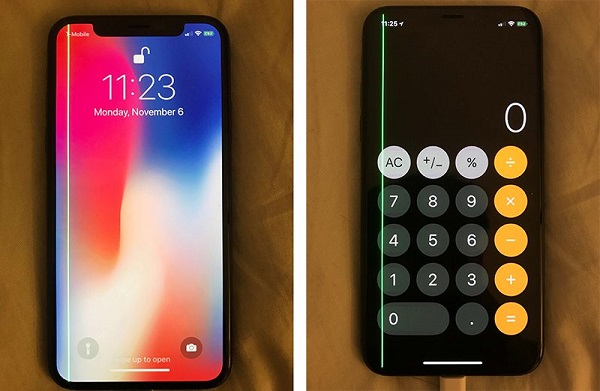
A Line Appeared on Your Screen After a Drop – What Should You Do?
A vertical or horizontal line appearing on your display after a drop is one of the most common screen failures on both Samsung and iPhone devices.
Sometimes it’s minor; in most cases, it means the internal OLED/LCD layer is damaged.
Here’s what the line actually means — and what you should do next.
1. Screen-Line Problems Are Extremely Common After Drops
At our Christchurch and Auckland repair shops, we see dozens of devices every week with green lines, pink lines, white bars, flickering patches, or full half-display failure.
Even if the outer glass looks perfect, the internal display layers are thin and fragile — a single impact can break them instantly.
2. These Symptoms Are Exactly What Most People Experience
Typical signs after a drop include:
- Thin green or pink line from top to bottom.
- Thick black or white bar covering part of the screen.
- Flicker or ghosting around the impact area.
- Touch not working on one side.
- Line appears only sometimes — then becomes permanent.
These symptoms almost always indicate physical panel damage, even when the phone still responds normally.
3. What You Should Do (and Avoid Doing)
3.1 Restart the Phone
A simple restart confirms whether the issue is software-related.
If the line stays, it’s hardware damage.
3.2 Do Not Press the Screen
Many users “test” the screen by pressing on it.
This can crack the touch grid or cause the line to spread across the panel.
3.3 Check If the Line Moves or Flickers
If pressing the frame edges changes the line, the OLED/LCD layers are fractured internally.
3.4 Back Up Your Data Immediately
Lines often spread until the entire display shuts off.
Back up your data before the screen goes completely black.
3.5 Replace the Screen — It’s the Only Real Fix
There is no software fix, no app, and no reset that can repair broken internal display lines.
The solution is a full screen replacement (OLED or LCD depending on the model).
3.6 Real Cases from Our Stores
- iPhone 13 Pro — thin green line → OLED damage.
- Samsung S21 — pink vertical line after corner impact.
- iPhone X — rainbow flicker → display matrix tear.
- Note 20 Ultra — half-screen blackout after drop.
4. Why Lines Appear After a Drop (Technical Reason)
OLED and LCD panels have microscopic layers including sub-pixels, data lines, colour filters, and touch circuits.
A drop can damage one or more of these internal layers without cracking the outer glass.
Common internal failures include:
- Data-line failure → thin coloured lines.
- OLED tear → green or pink line, flicker.
- LCD backlight damage → thick white/black bars.
- Touch sensor fracture → unresponsive area on screen.
- Connector shock → intermittent flickering lines.
All of these are physical faults — meaning replacement is required.
5. Related Guides for NZ Users
This article is for general information and reference only. Device conditions vary, and you should not rely solely on this content to make repair or safety decisions.
For accurate diagnosis or repair, please have your device inspected by a qualified technician.