
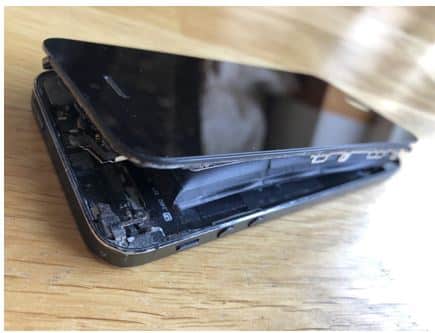
Can I Replace a Swollen Phone Battery Myself? (iPhone & Samsung Safety Guide)
A swollen battery is dangerous. It can push the screen out, damage cables, leak gases, or in rare cases ignite.
Many people ask if they can replace it at home. Here’s the real answer based on daily repair work in our NZ shops.
1. We See Swollen Batteries Every Week — And Most Are Already Dangerous
In Christchurch and Auckland, swollen batteries are far more common than people think.
iPhones, Samsungs, budget Androids — all brands fail the same way when the internal lithium cell degrades or overheats.
The moment the screen starts lifting or the back cover separates, the battery is already unsafe.
Many customers tell us they tried to push the screen back down. That only makes it worse.
2. If You’re Thinking About DIY, You’re Not Alone
Typical reasons people want to replace it at home:
- “Repair shops charge too much.”
- “I watched a YouTube tutorial and it looked easy.”
- “It’s just a battery — how hard can it be?”
- “The phone still works, so I’ll deal with it later.”
These thoughts are normal. But swollen batteries behave differently from normal ones.
Once the cell expands, it becomes fragile, unpredictable, and extremely heat-sensitive.
3. What We See in Real Repairs (And Why DIY Often Goes Wrong)
3.1 Screens Crack from Inside Pressure
We often see OLED panels cracked internally because the battery pushed upward.
Opening a phone with pressure already built up can shatter the display instantly.
3.2 Adhesive and Sharp Tools Make It Worse
Modern smartphones use strong waterproof glue.
DIY attempts often involve metal pry tools — one slip, and the swollen cell tears.
A punctured lithium cell releases smoke, extreme heat, and sometimes flame.
3.3 Swollen Batteries Hate Heat
To open a phone safely, professionals use controlled temperature mats.
If you heat a swollen battery the wrong way (hair dryer, heat gun), the cell can vent or ignite.
3.4 Internal Cables Get Damaged Easily
When the screen lifts, flex cables stretch.
Removing the battery at home without disconnecting the board properly can rip these, adding a $200+ repair on top.
3.5 What We Recommend Instead
- Stop using the phone immediately.
- Avoid pressing the screen down.
- Do not charge it again until checked.
- Store it in a cool, dry place away from flammable items.
- Bring it in for professional replacement ASAP.
4. Why Swollen Batteries Are So Dangerous (Science)
A swollen phone battery means the lithium-ion cells have chemically decomposed.
Gas builds inside the pouch, increasing internal pressure.
Scientific sources (Samsung SDI Technical Report, Apple Battery Chemistry Guide) explain:
- Gas forms when the electrolyte breaks down under heat or age.
- The pouch becomes fragile and prone to puncture.
- Oxygen in leaked gas reacts violently if ignited.
This is why swollen batteries should never be pressed, bent, or stabbed with tools — even accidentally.